AWS BedRock - Boto3 Demo - Stability AI

SDXL, a high-quality image generation model, excels in open photorealism, allowing diverse art styles without imposing a specific 'feel.' SDXL 1.0 emphasizes vibrant, accurate colors with improved contrast, lighting, and shadows in native 1024x1024 resolution. Notably, it tackles challenging concepts like hands, text, and spatial arrangements. Developed by Stability AI, a leading open-source generative AI company, SDXL finds applications in artwork generation, creative tooling, and education. This diffusion-based text-to-image model, version 1.0, showcases stability and proficiency, generating detailed images based on text descriptions, and supporting tasks like inpainting, outpainting, and image-to-image translations with a maximum token limit of 77.
Previous Blog on this Learning Series
Blog 1: https://www.dataopslabs.com/p/aws-bedrock-learning-series-blog
Blog 2: https://www.dataopslabs.com/p/family-of-titan-text-models-cli-demo
Blog 3: https://www.dataopslabs.com/p/family-of-titan-text-models-boto3
Blog 4: https://blog.dataopslabs.com/aws-bedrock-boto3-demo-anthropic-claude
Blog 5: https://blog.dataopslabs.com/aws-bedrock-boto3-demo-ai21-labs
Blog 6: https://blog.dataopslabs.com/aws-bedrock-boto3-cohere-model
Blog 7: https://blog.dataopslabs.com/aws-bedrock-boto3-demo-llama2-model
Github Link - Notebook
https://github.com/jayyanar/learning-aws-bedrock/blob/main/blog8/Bedrock_stability_Boto3.ipynb
Environment Setup
I am using vscode local environment with AWS Credential configured.
Install Latest Python
! python --version
Python 3.11.5
Upgrade pip
! pip install --upgrade pip
Install latest boto3,awscli, boto3-core
! pip install --no-build-isolation --force-reinstall \
    "boto3>=1.33.6" \
    "awscli>=1.31.6" \
    "botocore>=1.33.6"
Load the Library
import json
import os
import sys

import boto3
import botocore

bedrock = boto3.client(service_name="bedrock")
bedrock_runtime = boto3.client(service_name="bedrock-runtime")
Stability AI - SDXL Model
Set the Prompts and Styles
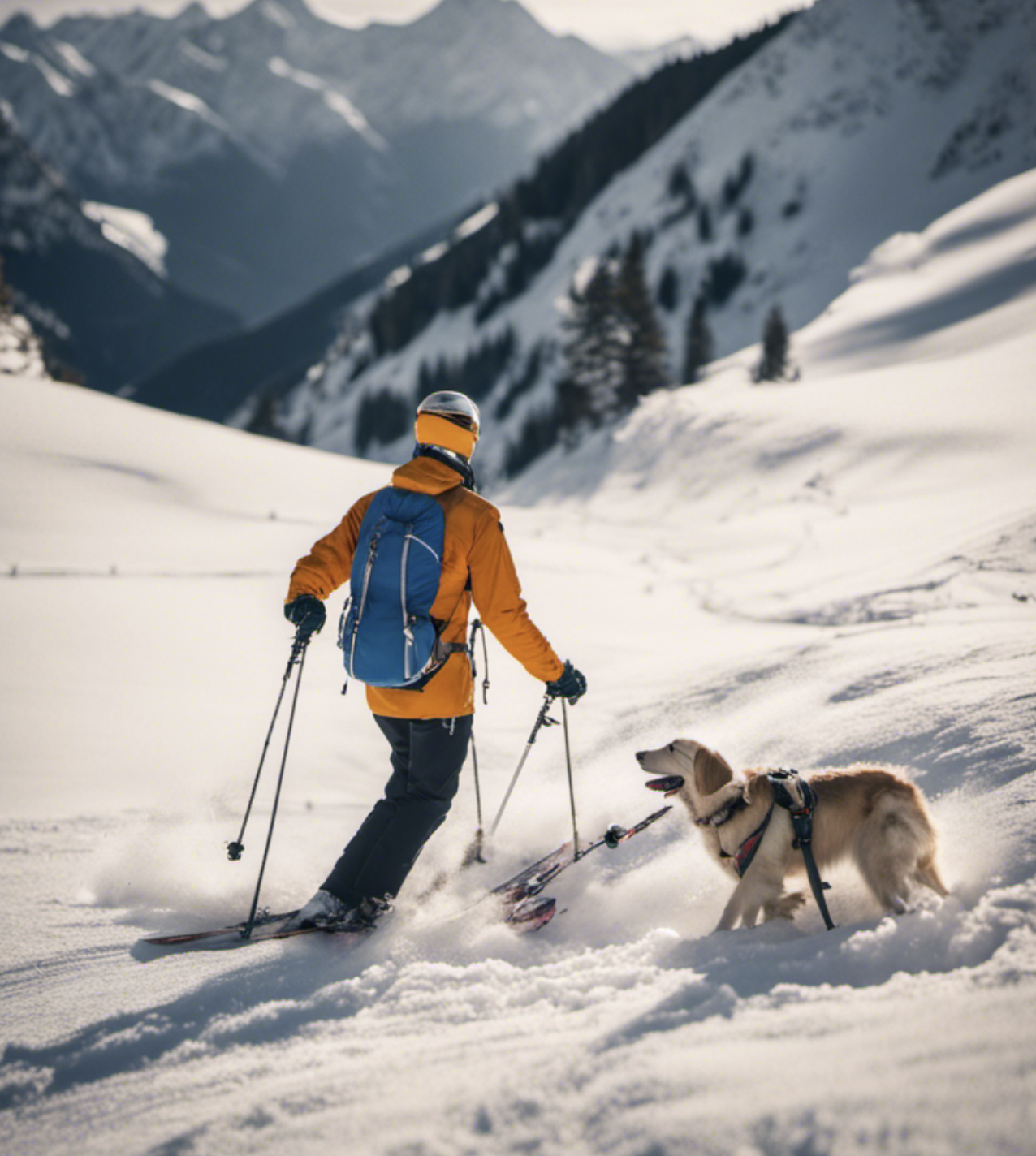
stability_image_prompt = "Skiing on Alps Mountain with my Golden Retreiver Dog"
negative_prompts = [
    "poorly rendered",
    "poor background details"
]
style_preset = "photographic"  # (e.g. photographic, digital-art, cinematic, ...)
clip_guidance_preset = "FAST_GREEN" # (e.g. FAST_BLUE FAST_GREEN NONE SIMPLE SLOW SLOWER SLOWEST)
sampler = "K_DPMPP_2S_ANCESTRAL" # (e.g. DDIM, DDPM, K_DPMPP_SDE, K_DPMPP_2M, K_DPMPP_2S_ANCESTRAL, K_DPM_2, K_DPM_2_ANCESTRAL, K_EULER, K_EULER_ANCESTRAL, K_HEUN, K_LMS)
width = 768
Configure the Model configuration
request = json.dumps({
    "text_prompts": (
        [{"text": stability_image_prompt, "weight": 1.0}]
        + [{"text": negprompt, "weight": -1.0} for negprompt in negative_prompts]
    ),
    "cfg_scale": 5,
    "seed": 452345,
    "steps": 60,
    "style_preset": style_preset,
    "clip_guidance_preset": clip_guidance_preset,
    "sampler": sampler,
    "width": width,
})
Invoke the Model
response = bedrock_runtime.invoke_model(
    body=request,
    modelId="stability.stable-diffusion-xl-v1",
)
Parse the response for Image
response_body = json.loads(response.get("body").read())
print(response_body["result"])
base_64_img_str = response_body["artifacts"][0].get("base64")
print(f"{base_64_img_str[0:80]}...")
Store the Image
# Python Built-Ins:
import base64
import io
import json
import os
import sys

# Ensure the "data" directory exists, or create it if it doesn't
os.makedirs("data", exist_ok=True)

# Assuming `base_64_img_str` contains a base64-encoded image string

# Decode the base64 image string and create a PIL Image
stability_imageout = Image.open(io.BytesIO(base64.decodebytes(bytes(base_64_img_str, "utf-8"))))

# Save the PIL Image as a PNG file in the "data" directory
stability_imageout.save("data/alps_img.png")

# Display the saved image (optional, not required for saving)
stability_imageout
Image Output
Stability SDK - Basic Inference
DreamStudio introduces a user-friendly interface designed for crafting images through the cutting-edge Stable Diffusion image generation model. This model, known for its speed and efficiency, seamlessly translates text into captivating images, demonstrating a profound understanding of the intricate relationships between words and visual elements. In this tutorial notebook, we will guide you through the process of setting up the Stability SDK package, providing you with the tools to harness the power of our API for fundamental inference calls. Explore the potential of image creation and unleash your creativity with DreamStudio and the Stable Diffusion model.
Notebook to Play
Prerequisites - https://github.com/jayyanar/genai-apps/blob/main/prerequisites.md#4-create-dreamstudio-account
Code to Play
https://github.com/jayyanar/genai-apps/blob/main/lab3_gen_images.ipynb